
Home / Formats
Export formats: CSV, JSON, Markdown and HTML
X Bookmarks Exporter saves your bookmarks in four formats. Pick the one that fits what you'll do next.
What each bookmark includes
Post text (including long posts), author name and @handle, date, likes, reposts and replies, media links, the quoted post link and the post URL.
The fields
CSV and JSON use the same eleven fields.
| Field | What it holds |
|---|---|
id | The post's ID. |
url | The link to the post on x.com. |
authorName | The author's display name. |
authorHandle | The author's @handle, written without the @. |
text | The post text, including long posts. |
createdAt | The date and time of the post, in the standard ISO 8601 format (UTC). Empty or null if X didn't show one. |
likes | Number of likes. |
retweets | Number of reposts. The field keeps the name retweets. |
replies | Number of replies. |
media | Links to the post's media. In CSV they're separated by spaces; in JSON they're a list. |
quotedUrl | The link to the quoted post, if there is one. |
CSV: for spreadsheets
It opens in Excel, Google Sheets or Numbers, with one row per bookmark and a header row. Columns: id, url, authorName, authorHandle, text, createdAt, likes, retweets, replies, media, quotedUrl.
- It's a standard UTF-8 file, so it opens in Excel, Google Sheets or Numbers.
- Text that starts with a character a spreadsheet could read as a formula (
=,+,-or@) is prefixed with an apostrophe, as protection against spreadsheet formula tricks. - In Google Sheets, use File > Import and upload the file. Notion can import a CSV as a database.
id,url,authorName,authorHandle,text,createdAt,likes,retweets,replies,media,quotedUrl
1790000000000000000,https://x.com/juniper_quill_demo/status/1790000000000000000,Juniper Quill,juniper_quill_demo,"A 12-step checklist for shipping your first side project in a weekend. Bookmark this one.",2026-09-28T09:15:00.000Z,1243,210,56,https://example.invalid/media/sample0.jpg,JSON: for scripts and your own tools
It's a list of bookmarks with the same fields as the CSV. Any field X didn't provide is null, and media is a list.
[
  {
    "id": "1790000000000000000",
    "url": "https://x.com/juniper_quill_demo/status/1790000000000000000",
    "authorName": "Juniper Quill",
    "authorHandle": "juniper_quill_demo",
    "text": "A 12-step checklist for shipping your first side project in a weekend. Bookmark this one.",
    "createdAt": "2026-09-28T09:15:00.000Z",
    "likes": 1243,
    "retweets": 210,
    "replies": 56,
    "media": ["https://example.invalid/media/sample0.jpg"],
    "quotedUrl": null
  }
]
Markdown: for Obsidian and other notes apps
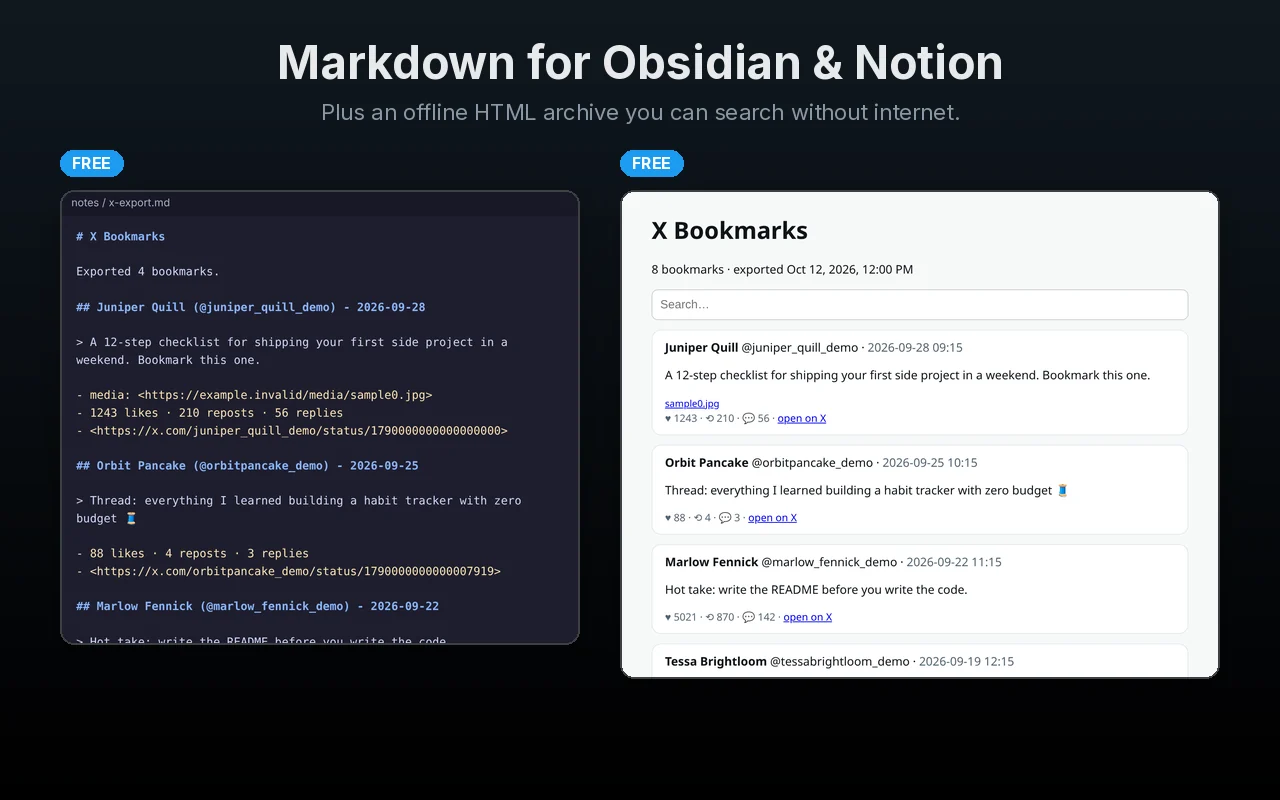
It's one file with a heading, the post text and its links for each bookmark. Each heading has the author, @handle and date, followed by the post text as a quote and the links.
# X Bookmarks

Exported 4 bookmarks.

## Juniper Quill (@juniper_quill_demo) - 2026-09-28

> A 12-step checklist for shipping your first side project in a weekend.

- media: <https://example.invalid/media/sample0.jpg>
- 1243 likes · 210 reposts · 56 replies
- <https://x.com/juniper_quill_demo/status/1790000000000000000>
It's plain Markdown, with no tags or front matter. Put the file in your Obsidian vault folder and it opens as a normal note: step-by-step guide. Notion can import a Markdown file as a page.
HTML archive: for reading and searching offline
It's one page you can open without internet, with a search box. Media appears as links.
- Each bookmark is a card with the author, @handle, date, post text, media links, the quoted post link, likes, reposts, replies and an "open on X" link.
- The search box filters the page as you type.
The limit
Every export includes up to 300 bookmarks. See the FAQ.
Get X Bookmarks Exporter
Free. Runs locally. Up to 300 bookmarks per export.